DoTs SDK Development: Automating TypeScript Client Generation

By mchittupolu
- Published:
- 7 min read
At DigitalOcean, our mission is to simplify cloud and AI to empower developers to focus on building great software. As part of that mission, we strive to make our tools and services accessible to developers in their preferred languages.
Starting with GoDo, our Go SDK, we made it easy for developers to interact with DigitalOcean resources. Then came PyDo, our Python SDK, expanding support for even more ecosystems. Now, we’re excited to introduce DoTs. Now, our TypeScript SDK empowers developers to leverage TypeScript’s type safety and modern development features, enabling them to manage their DigitalOcean resources. In this blog, we’ll share insights into the making of DoTs and the approach we took to develop it.
Why TypeScript?
TypeScript has been a game-changer for modern development, especially when working on large, complex applications. By introducing static type checking, it helps catch errors during compilation, long before they can cause issues in production. This not only improves the reliability and maintainability of the codebase but also saves significant time and effort that would otherwise go into debugging post-deployment. On top of that, TypeScript enhances the developer experience with features like intelligent code completion, inline documentation, and clear error highlighting in IDEs, making the development process smoother and more efficient.
Automating SDK Generation with OpenAPI, GitHub Actions and Kiota
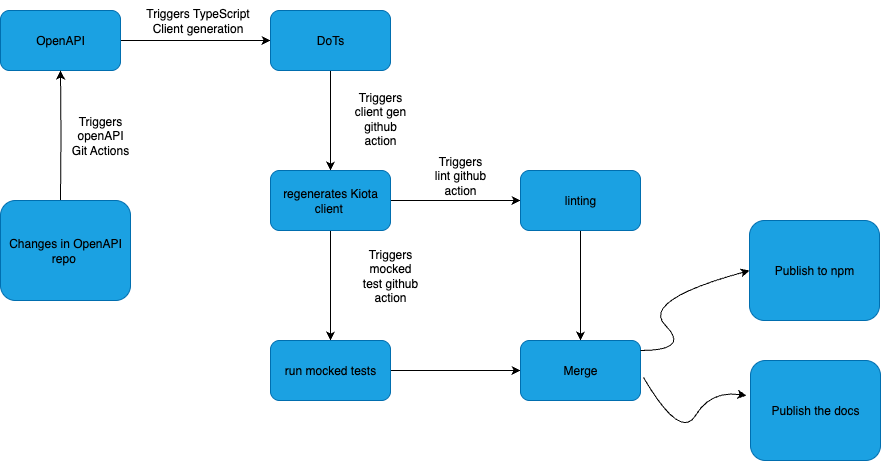
Traditionally, building SDKs for new ecosystems required extensive manual effort, including writing boilerplate code in multiple programming languages. This approach was not only time-consuming but also prone to errors. However, the rise of automated code generation has transformed SDK development, enabling companies to deliver consistent, high-quality SDKs across various languages with minimal manual intervention. While OpenAPI only defines the structure of the API, we use GitHub Actions to automate the entire process from validating the OpenAPI spec, generating the client code with Kiota, and even publishing the generated client documentation. This setup ensures the SDK is always aligned with the latest API changes.
Requirements:
In addition to the functionality of the TypeScript SDK we had several engineering requirements to meet that would help make this SDK easy to deploy, maintain and update. The engineering requirements include:
-
Client Generation: Client should automatically generate from OpenAPI 3.0 Specification
-
Automated Testing: Testing for client generation is fully automated and integrated into the CI pipeline.
-
Automated Documentation: The documentation for client generation is automatically created and hosted on Read the Docs.
-
CI/CD Support: An automated workflow was implemented to keep DoTs in sync with the latest DigitalOcean OpenAPI 3.0 Specification.
Kiota: A Tool for Client Generation
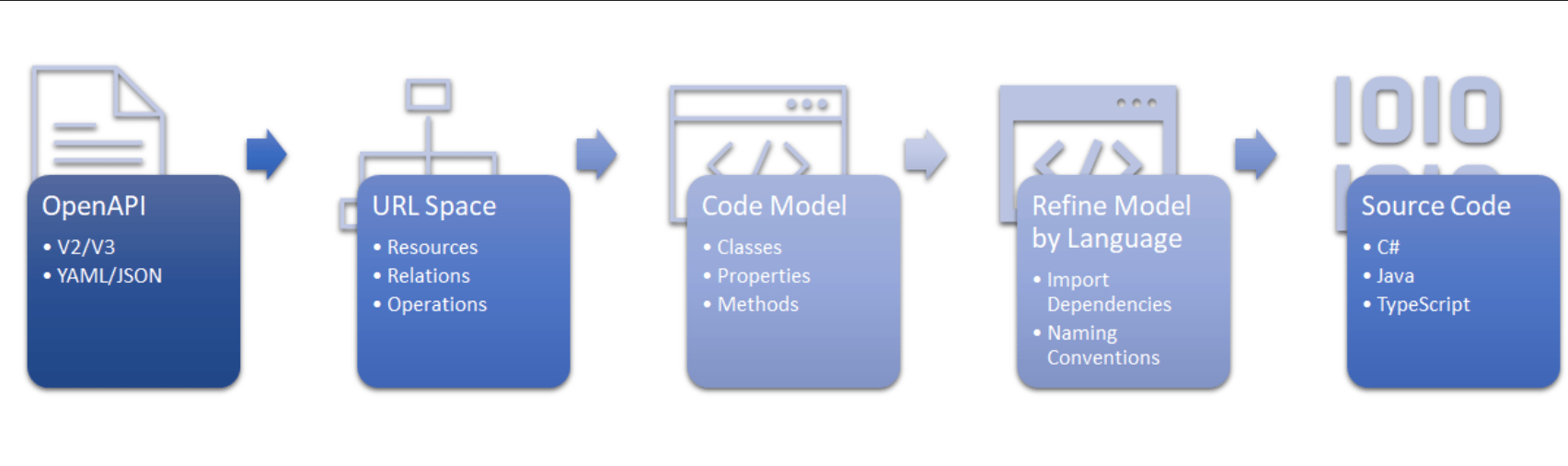
Kiota is an open source API client code generator from Microsoft that converts OpenApi specifications into strongly typed SDKs in languages like TypeScript, Python, C# and more. Kiota simplifies SDK code generation by parsing OpenAPI descriptions using the Microsoft.OpenApi.NET library, which efficiently handles large-scale API definitions. It constructs a hierarchical URI space tree from PathItems, enabling readable and scalable code generation while filtering unused resources to keep libraries lightweight. Kiota uses a language-agnostic code model instead of traditional templates, ensuring consistency across languages and reducing maintenance complexity. The generated code connects to core libraries via Kiota abstractions, enabling HTTP requests without dependency on specific HTTP client libraries, ensuring flexibility and a consistent developer experience.
Authenticating Client in Kiota
Kiota provides a flexible and modular approach to client authentication, allowing developers to integrate various authentication mechanisms seamlessly. Authentication in Kiota is handled through the AuthenticationProvider interface, which enables developers to define custom logic for authenticating HTTP requests. This design ensures that the generated client remains adaptable to different authentication strategies, such as API keys, OAuth tokens, or custom headers.
Implementing an Authentication Provider
To authenticate a client in Kiota, you need to implement the AuthenticationProvider interface. This interface defines a method, authenticateRequest, which is responsible for adding authentication details to outgoing HTTP requests.
Here’s an example of an API key-based authentication provider:
**

import { AuthenticationProvider, RequestInformation } from "@microsoft/kiota-abstractions";


/** Authenticate a request by using an API Key */

export class DigitalOceanApiKeyAuthenticationProvider implements AuthenticationProvider {

   /**

    * @constructor Creates an instance of ApiKeyAuthenticationProvider

    * @param apiKey The API Key to use for authentication

    */

   public constructor(

       private readonly apiKey: string,

   ) {

       if (!apiKey) {

           throw new Error("apiKey cannot be null or empty");

       }

   }

   public authenticateRequest(

       request: RequestInformation,

       // eslint-disable-next-line @typescript-eslint/no-unused-vars

       additionalAuthenticationContext?: Record<string, unknown> | undefined

   ): Promise<void> {

       request.headers.add("Authorization", `Bearer ${this.apiKey}`);

       return Promise.resolve();

   }

}
This provider adds an Authorization header with the API key to each request, enabling secure communication with the API.
Setting Up the Client
Once the authentication provider is implemented, it can be passed to the Kiota-generated client during initialization. For example:
import { FetchRequestAdapter } from "@microsoft/kiota-http-fetchlibrary";

import { createDigitalOceanClient } from "../src/dots/digitalOceanClient.js";

import { DigitalOceanApiKeyAuthenticationProvider } from '../src/dots/DigitalOceanApiKeyAuthenticationProvider.js';

const token = 'api-key';

if (!token) {

   throw new Error("DIGITALOCEAN_TOKEN not set");

}


const authProvider = new DigitalOceanApiKeyAuthenticationProvider(token!);

const adapter = new FetchRequestAdapter(authProvider);

const client = createDigitalOceanClient(adapter);

const resp = await client.v2.droplets.post(clientRequest);
This code configures a Kiota client with API key authentication and makes a secure POST request to create a Droplet via the /v2/droplets endpoint.
Creating a DigitalOcean Droplet and Attaching a Volume:
import { FetchRequestAdapter } from "@microsoft/kiota-http-fetchlibrary";

import { createDigitalOceanClient } from "../src/dots/digitalOceanClient.js";

import { DigitalOceanApiKeyAuthenticationProvider } from '../src/dots/DigitalOceanApiKeyAuthenticationProvider.js';

import {Volume_action_post_attach, Volumes_ext4} from "../src/dots/models/index.js";

import { v4 as uuidv4 } from 'uuid';


const token = process.env.DIGITALOCEAN_TOKEN;

const sshKeyName = process.env.SSH_KEY_NAME;

const REGION = "nyc3";


const authProvider = new DigitalOceanApiKeyAuthenticationProvider(token!);

const adapter = new FetchRequestAdapter(authProvider);

const client = createDigitalOceanClient(adapter);


async function main() {

   // Find SSH key fingerprint

   const sshKeys = await client.v2.account.keys.get();

   const sshKey = sshKeys.sshKeys?.find(k => k.name === sshKeyName);


   // Create Droplet

   const dropletReq = {

       name: `test-${uuidv4()}`,

       region: REGION,

       size: "s-1vcpu-1gb",

       image: "ubuntu-22-04-x64",

       ssh_keys: [sshKey?.fingerprint],

   };

   const dropletResp = await client.v2.droplets.post(dropletReq);

   const dropletId = dropletResp.droplet?.id;


   // Create Volume

   const volumeReq : Volumes_ext4 = {

       sizeGigabytes: 10,

       name: `test-${uuidv4()}`,

       description: "Block storage testing",

       region: REGION,

       filesystemType: "ext4",

   };

   const volumeResp = await client.v2.volumes.post(volumeReq);

   const volumeId = volumeResp.volume?.id;


   // Attach Volume to Droplet

   const attachReq : Volume_action_post_attach = { dropletId, type: "attach" };

   await client.v2.volumes.byVolume_id(volumeId!).actions.post(attachReq);


   console.log("Droplet and volume created and attached!");

}


main();
Automated Testing
Every commit to the Dots repository, whether manually created or automatically generated, follows Continuous Integration (CI) workflows to ensure no errors are introduced. The process involves running code linters for style validation. Mocked and Integration tests are implemented and executed using Jest to ensure the reliability and stability of the client.
Mocked Tests
Mocked tests ensure that the generated client contains all the expected classes and methods for the corresponding API resources and operations. These tests focus on individual operations using mocked responses, making them fast and efficient to run as they do not require a valid token or access to actual resources. We chose Jest for this purpose because it’s fast and developer-friendly
Integration Tests
Integration tests replicate real-world scenarios where a customer interacts with the API through the client. These tests require a valid API token and create actual resources on the associated DigitalOcean account, ensuring the client behaves as expected in production-like environments.
Automated Documentation
One of the key benefits of generating a client from a single source of truth, such as the OpenAPI 3.0 specification, is the ability to produce documentation that is always aligned with the generated client. For Dots, we leveraged TypeDoc, which works seamlessly with Kiota-generated code to create up-to-date documentation, then we have incorporated this to readthedocs which hosts the documentation on every release. This ensures that developers have access to accurate and comprehensive references for the client without requiring manual updates.
CI/CD Integration: Keeping the Client Up-to-Date
Generating code is the first step of the process, automating the code generation when openAPI spec generates ensures it stays up-to-date. Using GitHub Actions, changes in the OpenAPI repository automatically initiate dots to generate libraries and push them to the Dots repository.
Kiota Behavior
Kiota applies several transformations to API responses:
Parameter Case Conversion:
Kiota automatically converts parameters from snake_case to camelCase when generating API requests. This ensures consistency with TypeScript’s camelCase conventions and helps avoid naming mismatches.
Reserved Keyword Handling:
To prevent conflicts with reserved keywords, Kiota modifies them during code generation. For example, a property like default: true is transformed to defaultEscaped: true.
Known Issues
Kiota currently generates nested value fields for nested arrays, which is a Kiota issue by design, you can find more information about the issue here
Conclusion
We are thrilled to launch Dots and provide developers with a streamlined, efficient way to interact with their APIs. By leveraging Kiota for client generation, automated workflows, and robust testing, we’ve built a solution that prioritizes reliability, scalability, and ease of use. We’re excited for users to explore Dots and see how it simplifies their development workflows. As always, we welcome feedback and look forward to seeing how Dots empowers your projects!
About the author

Related Articles

The Inference Alpha: Maximizing Frontier Models on AMD
Balaji Varadarajan
- June 10, 2026
- 12 min read

The Inference Tax: How Prefix-Aware Routing Eliminates the Hidden Cost of LLMs at Scale
- June 1, 2026
- 13 min read

DigitalOcean Serverless Inference: A Deep Dive
- June 1, 2026
- 17 min read