• Blog
  • Docs
  • Careers
  • Get Support
  • Contact Sales
DigitalOcean
  • Featured AI Products

    Compute

    Build, deploy, and scale cloud compute resources

    Containers and Images

    Safely store and manage containers and backups

    Managed Databases

    Fully managed resources running popular database engines

    Management and Dev Tools

    Control infrastructure and gather insights

    Networking

    Secure and control traffic to apps

    Security

    Help protect your account and resources with these security features

    Storage

    Store and access any amount of data reliably in the cloud

    Browse all products

  • AI/ML

    CMS

    Data and IoT

    Developer Tools

    Gaming and Media

    Hosting

    Security and Networking

    Startups and SMBs

    Web and App Platforms

    See all solutions

  • Community

    Documentation

    Developer Tools

    Get Involved

    Utilities and Help

  • Become a Partner

    Marketplace

  • Pricing
  • Log in
  • Sign up
  • Log in
  • Sign up

Company

  • About
  • Leadership
  • Blog
  • Careers
  • Customers
  • Partners
  • Referral Program
  • Affiliate Program
  • Press
  • Legal
  • Privacy Policy
  • Security
  • Investor Relations

Products

  • GPU Droplets
  • Bare Metal GPUs
  • Inference Engine
  • Data & Learning
  • Model Library
  • Droplets
  • Kubernetes
  • Functions
  • App Platform
  • Load Balancers
  • Managed Databases
  • Spaces
  • Block Storage
  • Network File Storage
  • API
  • Uptime
  • Cloud Security Posture Management (CSPM)
  • Identity and Access Management (IAM)
  • Cloudways
  • View all Products

Resources

  • Community Tutorials
  • Community Q&A
  • CSS-Tricks
  • Write for DOnations
  • Currents Research
  • DigitalOcean Startups
  • Wavemakers Program
  • Compass Council
  • Open Source
  • Newsletter Signup
  • Marketplace
  • Pricing
  • Pricing Calculator
  • Documentation
  • Release Notes
  • Code of Conduct
  • Shop Swag

Solutions

  • AI Training GPU
  • GPU Inference
  • VPS Hosting
  • Website Hosting
  • VPN
  • Docker Hosting
  • Node.js Hosting
  • Web Mobile Apps
  • WordPress Hosting
  • Virtual Machines
  • View all Solutions

Contact

  • Support
  • Sales
  • Report Abuse
  • System Status
  • Share your ideas

Company

  • About
  • Leadership
  • Blog
  • Careers
  • Customers
  • Partners
  • Referral Program
  • Affiliate Program
  • Press
  • Legal
  • Privacy Policy
  • Security
  • Investor Relations

Products

  • GPU Droplets
  • Bare Metal GPUs
  • Inference Engine
  • Data & Learning
  • Model Library
  • Droplets
  • Kubernetes
  • Functions
  • App Platform
  • Load Balancers
  • Managed Databases
  • Spaces
  • Block Storage
  • Network File Storage
  • API
  • Uptime
  • Cloud Security Posture Management (CSPM)
  • Identity and Access Management (IAM)
  • Cloudways
  • View all Products

Resources

  • Community Tutorials
  • Community Q&A
  • CSS-Tricks
  • Write for DOnations
  • Currents Research
  • DigitalOcean Startups
  • Wavemakers Program
  • Compass Council
  • Open Source
  • Newsletter Signup
  • Marketplace
  • Pricing
  • Pricing Calculator
  • Documentation
  • Release Notes
  • Code of Conduct
  • Shop Swag

Solutions

  • AI Training GPU
  • GPU Inference
  • VPS Hosting
  • Website Hosting
  • VPN
  • Docker Hosting
  • Node.js Hosting
  • Web Mobile Apps
  • WordPress Hosting
  • Virtual Machines
  • View all Solutions

Contact

  • Support
  • Sales
  • Report Abuse
  • System Status
  • Share your ideas
© 2026 DigitalOcean, LLC.Sitemap.
Product updates

Native .NET Buildpack Support is Now Available on App Platform

author

By Bikram Gupta

  • Published: March 5, 2026
  • 2 min read
<- Back to blog home

The .NET ecosystem continues to power a significant share of enterprise and cloud-native applications, from web APIs and microservices to full-stack applications built with ASP.NET Core. Developers building with C#, F#, and Visual Basic need a deployment experience that matches the productivity of the framework itself: push code, and let the platform handle the rest.

Today, we’re excited to announce native .NET buildpack support on DigitalOcean App Platform. You can now deploy your .NET applications directly from a Git repository without writing or maintaining Dockerfiles. App Platform automatically detects your .NET project, installs the correct SDK version, and builds your application for production.

Benefits

  • Zero Configuration: Push your .NET code to a Git repository, and App Platform handles runtime detection, SDK installation, and build configuration automatically—no Dockerfile required.
  • Multi-Language Support: Build applications in C#, Visual Basic, or F# using the .NET and ASP.NET Core frameworks, all with the same streamlined deployment experience.
  • Automatic SDK Management: App Platform selects the appropriate .NET SDK version based on your project’s TargetFramework or global.json configuration, supporting .NET 8.0, 9.0, and 10.0.
  • Production-Ready Defaults: The buildpack compiles with the Release configuration by default and automatically detects ASP.NET Core web applications to configure the correct process type.

How Detection Works

Once you connect your Git repository, App Platform identifies your application as a .NET project by looking for specific files in your repository root.

App Platform confirms a .NET application if it detects any of the following:

  • Solution files: *.sln, *.slnx

  • Project files: *.csproj, *.vbproj, *.fsproj

  • File-based apps: *.cs

Once detected, the buildpack takes over:

  • SDK Detection: Determines the required .NET SDK version from your TargetFramework property or global.json file
  • Dependency Restore: Runs dotnet restore to fetch NuGet packages
  • Build & Publish: Runs dotnet publish with the Release configuration
  • Process Registration: Automatically registers ASP.NET Core projects as web process types

Supported Runtimes

App Platform uses the Heroku .NET buildpack (version 42) and supports the following SDK versions on Ubuntu 22:
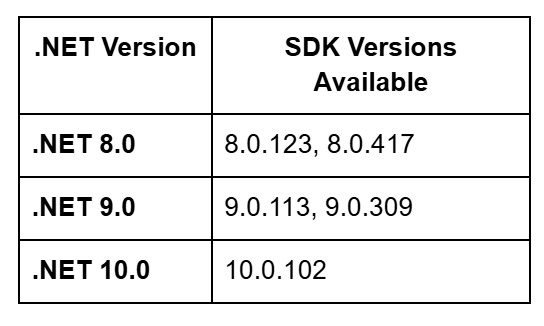
image alt text

The buildpack supports Target Framework Moniker (TFM) values in the format net{major_version}.0, such as net8.0, net9.0, and net10.0.

How to Get Started

Deploying a .NET application to App Platform takes just a few steps:

  • Via Control Panel: Create a new app, connect your Git repository, and App Platform automatically detects your .NET project and configures the build.
  • Via CLI: Use doctl apps create with an app spec pointing to your repository.
  • Via API: Call the Apps API to create and deploy your application programmatically.

For applications that need to bind to a specific port, ensure your code reads from the PORT environment variable:

CSharp

var port = Environment.GetEnvironmentVariable("PORT") ?? "5000";

builder.WebHost.UseUrls($"http://*:{port}");

Check out the .NET Buildpack documentation for advanced configuration options including custom SDK versions, build configurations, and MSBuild verbosity settings.

Native .NET buildpack support is available in all App Platform regions today. Connect your repository and deploy your first .NET application in minutes.

Check out the official documentation to get started.

About the author

Bikram Gupta
Bikram Gupta
Author
See author profile
See author profile

Share

  • Product Updates

Start building today

From GPU-powered inference and Kubernetes to managed databases and storage, get everything you need to build, scale, and deploy intelligent applications.
Sign up

Related Articles

Run Codex in the cloud – DigitalOcean for Codex is now available
Product updates

Run Codex in the cloud – DigitalOcean for Codex is now available

Ari Sigal
  • June 25, 2026
  • 3 min read

Read more

Server-Side Tools Are Now Available for DigitalOcean Inference Engine
Product updates

Server-Side Tools Are Now Available for DigitalOcean Inference Engine

Grace Morgan
  • June 17, 2026
  • 3 min read

Read more

Model Evaluations: Prove Your Routing Policy Actually Works
Product updates

Model Evaluations: Prove Your Routing Policy Actually Works

Sathish Jothikumar

  • June 4, 2026
  • 7 min read

Read more