Under the Hood: Serving Kimi K3

By Jonathan Dieu and Shree Murthy
- Updated:
- 12 min read
DigitalOcean launched Kimi K3 on day 0. It’s already one of the most popular models on the platform and across the market: second most likes on Hugging Face, sixth most traffic on OpenCode. Getting a model this size running well on day zero took real work across several teams. Thanks to Moonshot AI, Inferact, RadixArk, NVIDIA, and AMD for the help getting there.
Standing up a new model, integrating it into DigitalOcean’s Inference Engine, and showcasing its unique attributes on day 0 takes three things: the right hardware, a tuned serving stack, and rigorous verification against Moonshot’s own benchmarks.
Here are the lessons we learned along the way:
Hardware selection and implementation
We selected NVIDIA HGX™ B300 and AMD Instinct™ MI350x GPUs to run K3 because these instances provide the memory capacity, FLOPs, and interconnect horsepower necessary for a model of K3’s size and architecture. We built our distributed inference stack with llm-d because it includes native support for GPU type heterogeneity. This let us quickly onboard K3 to both AMD and NVIDIA platforms.
Kimi K3 has roughly 2.78 trillion total parameters, 896 routed experts, and an attention stack that interleaves 69 Kimi Delta Attention (KDA) layers with 24 Gated Multi-head Latent Attention (MLA) layers. Kimi-K3 weights are ~1.56 TB in total, which requires about 195 GiB per GPU.
Given such a large memory footprint for the weights alone, and a need to keep enough headroom for KV cache and activations, the practical unit of deployment is an 8x NVIDIA HGX B300 or AMD Instinct MI350X server. Both have 288GB of VRAM capacity, and after loading the weights, there is still some amount of practical memory left for the KV cache.
Entire weights cannot be loaded on a single GPU. That’s where the high-speed scaled-up NVIDIA’s NVLink or AMD’s Infinity Fabric is critical to ensure there is enough interconnect horsepower for bandwidth intensive, latency sensitive attention and expert parallel computations.
Model Optimization
The K3 serving recipe was optimized in collaboration with the vLLM team along the following dimensions:
Throughput scaling
We maximized input/output token throughput without sacrificing unit economics. Concretely, that meant three things:
- A tuned memory budget. We fine-tuned
gpu-memory-utilization, and MXFP4 quantization keeps Kimi K3’s ~1.4 TiB of weights small enough to leave memory headroom for KV cache. - A higher batching ceiling. We raised
max-num-batched-tokensso each scheduling step can pack more tokens per batch, lifting throughput per GPU without adding nodes. - A faster prefill path. Prefill runs through TensorRT-LLM’s ragged MLA attention backend with prefill-query quantization—a meaningfully faster prefill path than the default for a model this size.
Latency and concurrency
We looked for a concurrency sweet spot: enough simultaneous requests to keep token volume healthy, without letting latency degrade the user experience. Concretely, that meant three things:
- Staggered TTFT targets by prompt length. Rather than one flat TTFT SLA for every request, we set targets that scale with input length—from short prompts up to 1M-token inputs. We found that this matches real-world, mixed-workload traffic far better than a single flat target.
- Workload-specific ITL SLAs. Chat and agentic workloads have different inter-token latency needs, so we set separate ITL targets for each.
- TPS and E2E latency held to reasonable bounds throughout, so gains in throughput wouldn’t come at the user’s expense.
Infrastructure readiness
Serving a large model like Kimi-K3 on 8x servers means that the number of concurrent user sessions per server will be relatively low. Once we identified the concurrency sweet spot, along with supporting 1 million token context windows, we had enough data points to plan forNVIDIA HGX™ B300 and AMD Instinct™ MI350X capacity needed for the launch.
Model Verification
An open-weight model’s benchmark scores are only real if whoever serves it configures the serving stack correctly. A closed frontier model like Fable 5 or GPT 5.6 is tuned, served, and validated end-to-end by one vendor. Kimi K3 doesn’t get that: Moonshot publishes the weights, and every infra provider serving them, DigitalOcean included, has to independently get every decoding parameter, every parsing rule, and every wire-format detail right. If we get any of it wrong, the model underperforms its own published numbers—not because the weights are worse, but because the serving layer is.
Kimi K3 is a near-frontier model, competitive with Fable 5 and GPT 5.6 on real benchmarks. But that’s only true if the model is served correctly. Bad serving can turn a frontier model into a mediocre one. After previous model releases, Moonshot found that vendors serving identical weights were getting inconsistent benchmark results, sometimes due to decoding parameter mismatches, sometimes due to deeper serving-stack issues. That’s why they open-sourced the Kimi Vendor Verifier (KVV) alongside K2.6, to make sure every vendor serving their weights runs them correctly.
Moonshot open-sourced the Kimi Vendor Verifier (KVV) project alongside K2.6 for exactly this reason: they’d already learned that open-sourcing weights is only half the job. The other half? Making sure every vendor serving those weights runs them correctly.
Their conclusion, in their own words: the more open the weights and the more diverse the deployment channels, the less controllable quality becomes. If users can’t distinguish a model capability defect from an engineering implementation deviation, trust in the entire open-weight ecosystem erodes. Thus, KVV is Moonshot’s answer: a six-benchmark suite that every vendor has to pass, which includes decoding-param pre-verification, OCRBench, MMMU Pro, AIME2025, a tool-calling F1 and JSON-schema-accuracy benchmark, and SWE-Bench. Ongoing fixes contributed directly to vLLM, SGLang, and KTransformers, and pre-release access so vendors can catch problems before users do, with a public leaderboard of vendor results.
Every test in the KVV—tool-call schema injection, dynamic tools, streaming spec compliance, decoding-param handling—exists because a misconfigured serving stack can turn a genuinely near-frontier model into a much weaker one performing poorly on the quality benchmarks.
We also concretely tracked down BEAM, one of KVV’s stranger-sounding line items: it’s a long-term memory benchmark, run on synthetic conversations up to 1M tokens long. It’s also why several of the fixes we’ve shared are checked against Moonshot’s real fixtures. This includes a dynamic-tools message sending content: null or an exact usage.prompt_tokens integer—real values from Moonshot, not our own guess at what those fixtures should look like.
Dynamic Tool Calls
DigitalOcean’s inference proxy service is the single OpenAI-compatible gateway in front of 70+ models, across every major provider, plus our own dedicated deployments. Almost everything in that codebase is written to behave identically, no matter which model is used.
Kimi K3 deliberately breaks that assumption. Moonshot ships real extensions to the OpenAI API—features that only apply to their model. Dynamic tools is one of them. Supporting a single-vendor extension within a shared, multi-model proxy requires a surgical fix. This is exactly what kimi-k3 needs, with zero effect on any other model or code path that runs through the same proxy.
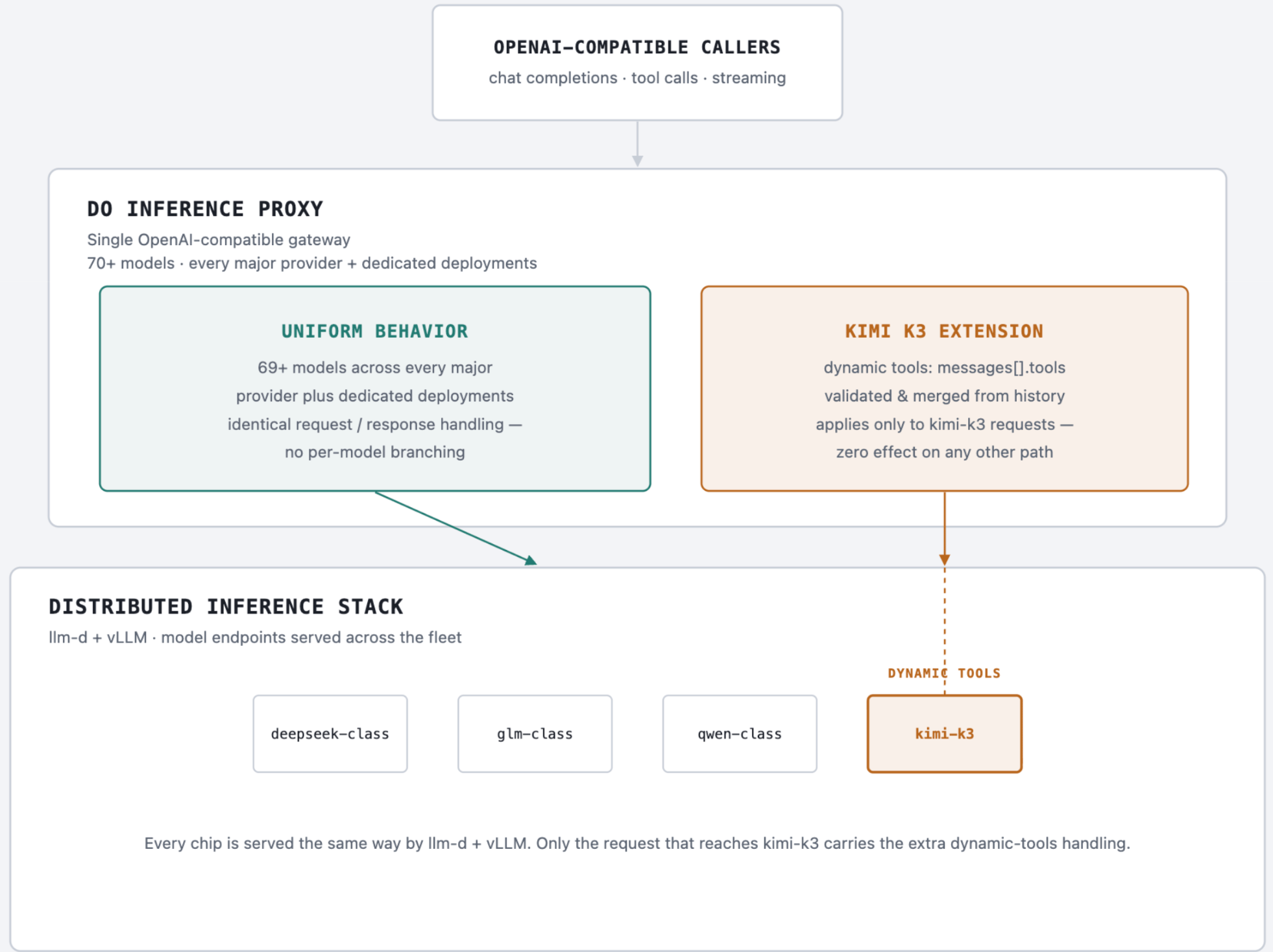
Dynamic tools are a Moonshot feature that we wanted to support on launch day. The point is to avoid tool definition bloat: if you have a large tool inventory, sending every schema with every request wastes tokens and makes the model more likely to pick the wrong tool. Instead, you declare a handful of core tools up front. To add more mid-conversation, you attach a tools field to a system message. That message always goes at the end of the conversation—never inserted earlier—so the existing prefix, and Moonshot’s prefix-based context cache, stays intact.
Moonshot’s Kimi Vendor Verifier (KVV) suite initially returned 30 failures against kimi-k3. 26 of them traced to one thing: we hadn’t implemented this feature at all.
OpenAI Chat Completions only lets you declare tools at the top level of a request. Moonshot’s K3 contract adds a second option: a client can attach a tools array to an individual message, like so:
| {“role”: “system”, “content”: “”, “tools”: [{“type”: “function”, “function”: {“name”: “get_weather”, …}}]} |
|---|
In other words, we hadn’t built the serving-layer half of this contract to validate the tools, merge them into the top-level array, and strip the key before forwarding to vLLM. Our message type is a raw JSON union, because it has to tolerate every OpenAI message shape a client might send. Thus, an unrecognized tools key on a message wasn’t rejected and wasn’t dropped either. It just rode along untouched to vLLM, which ignored it.
Live testing against a real preview kimi-k3 confirmed both failure modes: an invalid dynamic tool got a 200 error response (which should have been 400), and a valid tool was never actually callable. No error, no signal. One missing feature accounted for most of the failing benchmark.
The validator itself was straightforward once we had Moonshot’s contract:
- Tools can only live on a system message
- That message’s content must be empty
- Each tool needs a valid name matching a specific pattern
- No name can collide with anything else in the request.
Any violation anywhere rejects the whole request, not just the offending message. This entire path is gated on one check, modelMD.InternalName == “kimi-k3”. For every other model on the proxy, this code never runs at all.
The harder part was failing safely. Validate and merge in one pass, and you can end up mutating a request before you discover a later message fails validation.
We’d already hit that exact bug once in related strict-mode tool-schema work, so this time we built it as two separate passes:
- Pass one validates every message read-only and never touches the request
- Pass two runs (and only mutates) only after pass one has passed for the entire request.
Fail on message five of six, and message one’s dynamic tool is left completely untouched.
A few real bugs came out of testing against Moonshot’s actual fixtures instead of our own assumptions—Moonshot’s own Python reference implementation has this exact bug, for what it’s worth.
One fixture sends content: null with stream: true on a dynamic-tools message. Null content passes our “is this empty” check, but leaves it as null after stripping the tools key 422’d two layers downstream, in request-conversion code with its own opinion about content fields. Fix: canonicalize validated-empty content to “” before re-serializing.
Every kimi-k3 request was also paying a JSON marshal of every message just to check for a tools key, even though few carry one. We fixed this with a substring check on the raw bytes before the real parse. Doing this offered a low cost, and provably safe, solution for the user, since it can only produce false positives, never false negatives.
A related fix from the same effort relaxed the tool_choice=”auto”/”none” requirement to be accepted even without any tools present, closing one more failure bucket.
Together, a live re-run of Moonshot’s reproduction suite came back fully successful, with all tests passed!
Tool Call Schema Fixes
We found that K3’s tool-call parser only gets vLLM’s schema-constrained decoding under tool_choice=auto if the tool’s JSON Schema is shaped in OpenAI “strict mode”. This is characterized by additionalProperties:false at every level, all properties in required, and optional fields null-widened. Without that shaping, generation is unconstrained and produces malformed or empty tool-call arguments. We noted that required/any tool_choice values already get vLLM’s guaranteed structured-outputs backend by default, so only auto was affected.
We considered forcing tool_choice from auto to required at the proxy, but rejected that approach: it only “fixes” the benchmark because that dataset never has a legitimate “don’t call a tool” case. In real conversations, it would fabricate spurious tool calls whenever declining is correct.
For this reason, we never read tool_choice for anything beyond checking whether it resolves to auto, and we never modify it. We left tools with unsupported schema constructs (allOf/not/dependentRequired/$ref/etc, more than 10 nesting levels, or more than 5000 properties) completely unmodified rather than dropping or erroring them.
Thinking/Reasoning Effort Mapping
K3 exposes reasoning control via its own top-level thinking: {type, keep, effort} object, instead of, or in addition to, OpenAI’s reasoning_effort field.
We mapped these fields as follows:
type: “enabled”/“disabled” maps to chat_template_kwargs.thinking true/false (and disabled also drops any effort)keep: “all” maps to chat_template_kwargs.preserve_thinking trueeffort: maps to ReasoningEffort, which beats any client-supplied reasoning_effort and gets forwarded as chat_template_kwargs.reasoning_effort.
We set a precedence rule so that explicit client chat_template_kwargs values win over anything derived from the thinking object. We had to run this before the general extras-sanitization step, since sanitization wipes AdditionalProperties, which is where the untyped thinking object lives.
We closed a follow-up gap by validating the K3-style thinking.effort override the same way we already validated the top-level reasoning_effort field. Originally, these two entry points had asymmetric validation.
Streaming Output Errors
K3’s streaming responses deviated from the OpenAI spec in four distinct ways, each requiring its own fix at the proxy layer:
- Null-key omission: content/reasoning_content/refusal were being marshaled as explicit JSON null when absent, instead of having the key omitted entirely. We fixed this at the OpenAPI schema level (ChatCompletionStreamResponseDelta) by dropping nullable: true on those fields so they generate with omitempty. This is a global fix, applying to all models, not kimi-specific—we deliberately left the corresponding non-streaming response type alone, since its fields are required.
- Content/reasoning_content mutual exclusion: A single SSE frame could carry both content and reasoning_content in the same delta, even though the spec requires these to be mutually exclusive per frame. We fixed this with splitReasoningContentFrame, which splits one non-conforming frame into two.
- Boundary frame missing: K3 never emits the spec-required standalone {“reasoning_content”: “”} frame, marking the transition from reasoning to real content. We added a stage that inserts it, gated to kimi-k3 only, since fabricating this for a vendor that doesn’t have the concept would be noise, not a fix.
- Tool-call chunk hygiene: K3 sends the entire arguments string for a tool call in one shot in its first chunk, rather than streaming it incrementally — the spec requires the first chunk’s arguments to be “”, with real content arriving in continuation chunks that carry nothing but index+function.arguments. We added a stage that reshapes K3’s front-loaded blob into a compliant marker plus continuation.
An architecture note: We built the first two fixes independently, and they happened to live at the same point in the stream-processing pipeline, but we didn’t initially test them composed together. It turned out that one fix’s output could silently defeat the other’s guarantee on certain combined chunks—specifically, a first chunk that carries both content and reasoning_content. We consolidated all four fixes into a single ordered pipeline (chatStreamShaper), where each stage explicitly consumes the previous stage’s output list, not the raw chunk. This is because composability had to be made structural rather than assumed. We then caught one more real cross-stage bug before merge: the tool-call reshaping stage was silently dropping content/refusal when a chunk combined reasoning_content+content+tool_calls, a combination the mutual-exclusion stage’s own output could produce.
Prompt Token Drift
67-70 tokens were being injected as internal system messages and showing up as prompt token usage in the API response. We resolved this issue by mapping the thinking field to the VLLM chat_template_kwargs at the inference proxy layer.
A residual 3-token drift remains, due to sequences in the encoding_k3 file, but we’ve mitigated the primary discrepancy caused by the system message injection. The extra three tokens are a valuable token sequence that opens the channel to the model to start its response. This three token sequence is an open, response, sep sequence which acts as a handoff to the model to ensure it can start decoding correctly. Removing these three tokens will cause the model to behave incorrectly and not generate responses. As we seek to learn more about model capabilities, it was useful to learn about how the model leverages specific token ids to ensure that it can correctly execute its decode job. Every model is unique, and K3 is another step toward improving user experience by understanding the underlying architecture and tokenization.
Parameter Validation Corrections
The proxy originally rejected any temperature != 1.0 for kimi-k3, returning “temperature must be 1 for this model”. Moonshot clarified that their actual KVV requirement is to accept any temperature in [0, 1], since the model always samples at temp=1 internally, regardless of what’s sent. As a result, rejecting in-range values was breaking their own compliance validation. Moonshot specifically reported failing cases at temperature=0.6 (both think and non-think modes) and at temperature=0.0 (think mode). We fixed this by changing the temperature check from exact-match to range validation, and left top_p/presence_penalty/frequency_penalty/n unchanged.
What’s next for Kimi K3 on DigitalOcean
Kimi K3 is available today on DigitalOcean Inference Engine. Access it through Serverless Inference for fully managed, usage-based inference with no infrastructure to operate, or add it to your existing model mix with the Inference Router to intelligently route requests based on cost, latency, or workload. We’re excited to see what customers build with K3, and we’ll be sharing more soon about how teams are using it in production.
Want to see Kimi K3 in action? We built the same AI agent with and without Kimi K3, then compared the results side by side. See what changed, what didn’t, and where Kimi K3 made the biggest difference. Check it out: We Built the Same App Twice With and Without Kimi K3
*Performance metrics and benchmarking results described in this post are based on DigitalOcean’s internal testing using specific hardware configurations (including NVIDIA HGX™ B300 and AMD Instinct™ MI350X GPUs). Full methodology is available upon request.
About the author(s)

Related Articles

The Inference Alpha: Maximizing Frontier Models on AMD
Balaji Varadarajan
- June 10, 2026
- 12 min read

The Inference Tax: How Prefix-Aware Routing Eliminates the Hidden Cost of LLMs at Scale
- June 1, 2026
- 13 min read

DigitalOcean Serverless Inference: A Deep Dive
- June 1, 2026
- 17 min read