DigitalOcean's journey to Python Client generation

By Dana Elhertani
- Published:
- 7 min read
DigitalOcean prioritizes simplifying cloud computing to enable our customers to maximize their time building software. One of our ways of expanding on this priority is to build more SDKs for a wider variety of languages- giving developers options to interact with their DigitalOcean resources in their preferred language.
DigitalOcean currently has two supported SDK clients. Godo, DigitalOcean’s Go API Client, and our new Python Client, PyDo. We aim to support more SDKs and we’re finalizing which languages we’re going to deliver, so if you have a request for a DigitalOcean SDK in a particular language, please let us know at api-engineering@digitalocean.com.
In this blog post, we will dive into our journey of building our new Python Client, and how we used code generation to create the SDK.
Background on SDK builds
Traditional SDK builds require unique boilerplate code to bootstrap to a new ecosystem which may include coding in various languages. Recently, there has been an increase in the number of companies using code generation to create their SDKs for a variety of languages. We decided that this approach was the best way for us to deliver and maintain great SDKs.
To support generating the client, we looked into the OpenAPI Specification initiative. The OpenAPI Specification (OAS) defines a standard, language-agnostic interface to RESTful APIs which allows both humans and computers to discover and understand the capabilities of the service without access to source code, documentation, or through network traffic inspection. The OAS developer community has matured over the years and have opensourced powerful OAS toolchains. One of the tools being automatically generating a Python Client, which will be discussed in greater detail in this post.
Our Python Client Generation Requirements
At the start of our journey we laid out requirements we’d like our client to adhere to. The requirements were the following:
-
Client Generation: The client was automatically generated from the OpenAPI 3.0 Specification.
-
Optimal End User Experience: PyDo adhered to Python development best practices and followed “Pythonic” community conventions.
-
Automated Testing: PyDo testing was automated and a part of the CI.
-
Automated Documentation: Documentation for PyDo was automatically generated.
-
CI/CD Support: There was an automated process to ensure that PyDo was always up to date with the latest DigitalOcean OpenAPI 3.0 Specification.
Client Generation: Finding the Right Python Client Generation Tool
Autorest
The AutoRest tool generates client libraries for accessing RESTful web services. Input to AutoRest is a spec that describes the REST API using the OpenAPI Specification format. This is the tool we used to generate our new Python SDK. Another tool exists, called openapi-generator, but our Openapi 3.0 Specification uses advanced features such as Inheritance and Polymorphism that were not supported in openapi-generator at the time. Using Openapi 3.0 Inheritance/Polymorphism keywords (allOf, anyOf, oneOf) with openapi-generator caused the client to generate “UNKNOWNBASETYPE" which makes that client endpoint unusable. This is specific to Openapi 3.0. In Openapi 2.0 (swagger 2.0) one could get away with using “produces” and “consumes” in POST requests. With Openapi 3.0, that has been replaced with requestBody and the use of the inheritance keywords (allOf, anyOf, oneOf). Since our specification was very heavy with these unsupported advanced OpenAPI 3.0 features, and also among other reasons, we decided to move away from openapi-generator. Here is a Github thread that describes the issue in more detail.
Autorest supported our specification’s advanced uses of polymorphism and inheritance. Autorest also offered a wealth of features to further enhance end user experience. Creating a positive user experience when interacting with our Python client was our next objective to tackle.
Enhancing the Generated Code for an Optimal End User Experience
Autorest’s Directives
We found Autorest had a lot of features we could take advantage of out the box. This included their use of directives. Directives are used to tweak the generated code prior to generation, and are included in your configuration file (usually a README file), ultimately allowing you to further enhance your generated client. They have a wealth of directives to utilize. Below is an example of how we used a directive to have our Python Client, PyDo, render clearer error messages:
The directive:
where: '$.components.responses.unauthorized'

   transform: >

     $["x-ms-error-response"] = true;

 - from: openapi-document

   where: '$.components.responses.too_many_requests'

   transform: >

     $["x-ms-error-response"] = true;

 - from: openapi-document

   where: '$.components.responses.server_error'

   transform: >

     $["x-ms-error-response"] = true;

 - from: openapi-document

   where: '$.components.responses.unexpected_error'

   transform: >

     $["x-ms-error-response"] = true;
The code behavior without the directive:
$ python3 examples/poc_droplets_volumes_sshkeys.py

Looking for ssh key named user@odin...

Traceback (most recent call last):

  File "/home/user/go/src/github.com/digitalocean/digitalocean-client-python/examples/poc_droplets_volumes_sshkeys.py", line 32, in main

    ssh_key = self.find_ssh_key(key_name)

  File "/home/user/go/src/github.com/digitalocean/digitalocean-client-python/examples/poc_droplets_volumes_sshkeys.py", line 133, in find_ssh_key

    for k in resp["ssh_keys"]:

KeyError: 'ssh_keys'
The code behavior with the directive:
python3 examples/poc_droplets_volumes_sshkeys.py

Looking for ssh key named halkeye@odin...

Traceback (most recent call last):

  File "/home/user/go/src/github.com/digitalocean/digitalocean-client-python/examples/poc_droplets_volumes_sshkeys.py", line 138, in find_ssh_key

    self.throw(

  File "/home/user/go/src/github.com/digitalocean/digitalocean-client-python/examples/poc_droplets_volumes_sshkeys.py", line 26, in throw

    raise DigitalOceanError(message) from None

__main__.DigitalOceanError: Error: 401 Unauthorized: Unable to authenticate you
With the directive, the client rendered a much clearer error message. Autorest offers a wealth of directives you could take advantage of to further enhance their client.
Patch Customizations
Along with the directives feature, Autorest also had a customization feature to further enhance the client. This is done through updating the _patch.py files. We customized the _patchy.py file to simplify authorizing against the client. This is what the authorization step looked before the added customization:
import os

from azure.core.credentials import AccessToken

from pydo import DigitalOceanClient


api_token = os.environ.get("DO_TOKEN")

token_creds = AccessToken(api_token, 0)

client = DigitalOceanClient(credential=token_creds)
The user had to import an azure.core.credentials package to pass in their token credentials to properly be authenticated to access DO resources through the client. We were able to simplify this process a bit for the user by adding some customization to the _patch.py to abstract some unnecessary steps for the end user:
class TokenCredentials:

   """Credential object used for token authentication"""


   def __init__(self, token: str):

       self._token = token

       self._expires_on = 0

   def get_token(self, *args, **kwargs) -> AccessToken:

       return AccessToken(self._token, expires_on=self._expires_on)

class Client(GeneratedClient):  # type: ignore

   """The official DigitalOcean Python client

   :param token: A valid API token.

   :type token: str

   :keyword endpoint: Service URL. Default value is "https://api.digitalocean.com".

   :paramtype endpoint: str

   """

   def __init__(self, token: str, *, timeout: int = 120, **kwargs):

       logger = kwargs.get("logger")

       if logger is not None and kwargs.get("http_logging_policy") == "":

           kwargs["http_logging_policy"] = CustomHttpLoggingPolicy(logger=logger)

       sdk_moniker = f"pydo/{_version.VERSION}"

       super().__init__(

           TokenCredentials(token), timeout=timeout, sdk_moniker=sdk_moniker, **kwargs

       )

__all__ = ["Client"]
With these customizations, the authentication process for the client is now condensed to look like this:
import os

from pydo import Client


client = Client(token=os.getenv("$DIGITALOCEAN_TOKEN"))
Directives and patch customizations features that Autorest offered was a gamechanger for our client generation journey. It allowed us more control over the generated client and help support the optimal end user experience.
Automated Testing
Adhering to Continuous Integration practices, when you (or in most cases for this repo, automated commits from automatically generating our client code using Autorest) commit code to your repository, we continuously build and test the code to make sure that the commit doesn’t introduce errors. Our tests include code linters (which check style formatting), mocked tests, and integration tests. We use pytest to define and run the tests. There are two types of test suites we built for our CI workflow: mocked tests and integration tests.
Mocked Tests
Our mocked tests validate the generated client has all the expected classes and methods for the respective API resources and operations. They are tests that exercise individual operations against mocked responses. These are quick and easy to run since they do not require a real token or access any real resources.
Integration Tests
Integration tests simulate specific scenarios a customer might use the client for to interact with the API. These tests require a valid API token and DO create real resources on the respective DigitalOcean account.
Automated Documentation
The advantage of generating a client from a single source of truth, the Openapi 3.0 specification, is that one could generate documentation from that single source of truth and it would always be up to date with the generated client. This is exactly what we did. We used Sphinx to generate the documentation and then hosted the documentation on Read the Docs here
CI/CD Support: Make it automatic
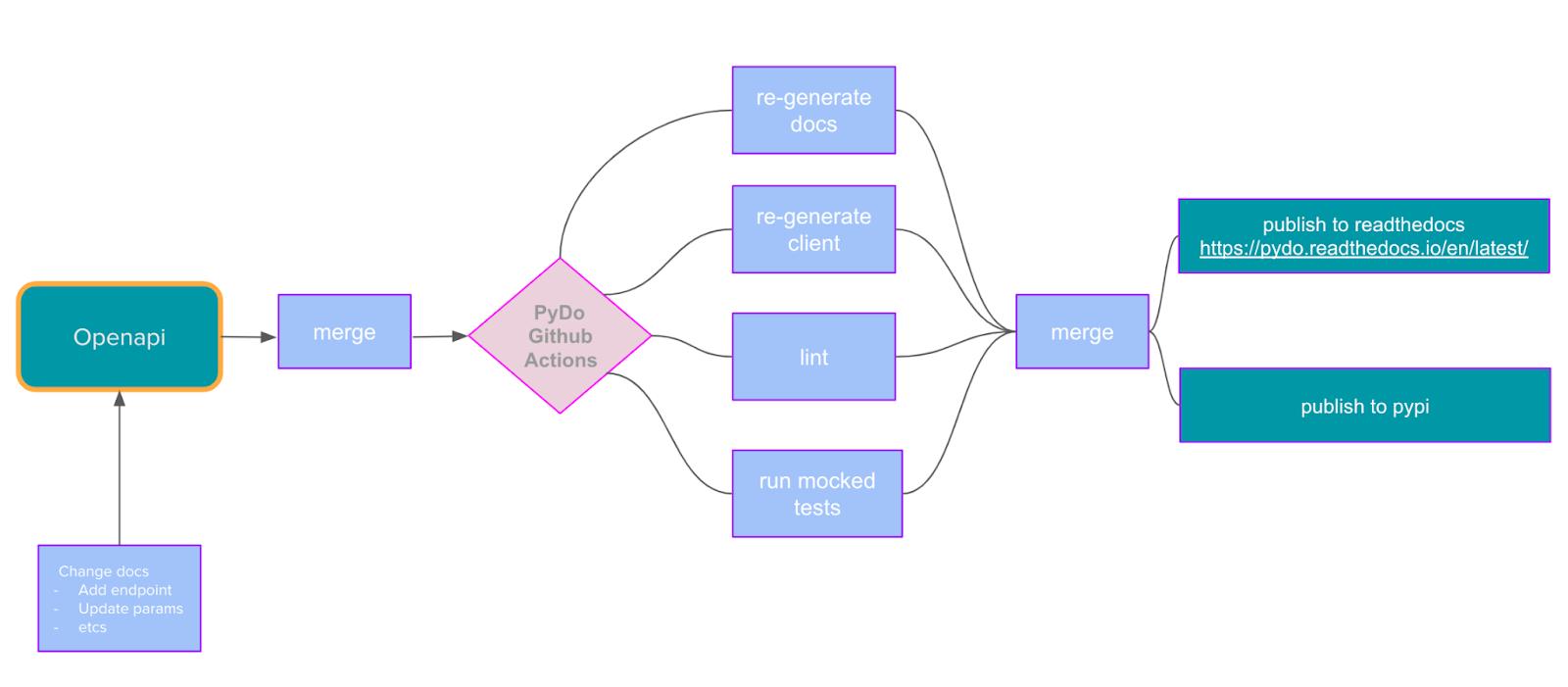
Generating code is one thing but making it automated is also an important step. To do that we use GitHub actions. Every time anything changes in our openapi repository the action kicks in, generating the libraries and pushing it into the pydo repository:
The workflow in the openapi repository that triggers PyDo’s Client Generation workflow:
name: Trigger Python Client Generation


on:

 workflow_run

   workflows: [Spec Main]

   types:

     - completed

jobs:


 build:


   name: Trigger digitalocean-client-python Workflow


   runs-on: ubuntu-latest

   if: ${{ github.event.workflow_run.conclusion == 'success' }}
   steps:

     - name: Check out code

       uses: actions/checkout@v2

     - name: Set outputs

       id: vars

       run: echo "::set-output name=sha_short::$(git rev-parse --short HEAD)"

     - name: Check outputs

       run: echo ${{ steps.vars.outputs.sha_short }}

     - name: trigger-workflow

       run: gh workflow run --repo digitalocean/digitalocean-client-python python-client-gen.yml --ref main -f openapi_short_sha=${{ steps.vars.outputs.sha_short }}

       env:

         GITHUB_TOKEN: ${{ secrets.WORKFLOW_TRIGGER_TOKEN }}
Pydo’s workflow that generates the client, documentation, and creates a PR:
name: Python Client Generation

on:

  workflow_dispatch:

    inputs:

      openapi_short_sha:

        description: 'The short commit sha that triggered the workflow'

        required: true

        type: string

jobs:

  Generate-Python-Client:

    runs-on: ubuntu-latest

    steps:

    - uses: actions/checkout@v3


    - name: Removes all generated code

      run: make clean


    - name: Download spec file and Update DO_OPENAPI_COMMIT_SHA.txt

      run: |

        curl --fail https://api-engineering.nyc3.cdn.digitaloceanspaces.com/spec-ci/DigitalOcean-public-${{ github.event.inputs.openapi_short_sha }}.v2.yaml -o DigitalOcean-public.v2.yaml

        echo ${{ github.event.inputs.openapi_short_sha }} > DO_OPENAPI_COMMIT_SHA.txt

      env:

        GH_TOKEN: ${{ secrets.WORKFLOW_TOKEN }}


    - uses: actions/upload-artifact@v2

      with:

        name: DigitalOcean-public.v2

        path: ./DigitalOcean-public.v2.yaml


    - name: Checkout new Branch

      run: git checkout -b openapi-${{ github.event.inputs.openapi_short_sha }}/clientgen

      env:

        GH_TOKEN: ${{ secrets.WORKFLOW_TOKEN }}


    - name: Install Poetry

      uses: snok/install-poetry@v1.3.1

      with:

        version: 1.1.13

        virtualenvs-path: .venv

        virtualenvs-create: true

        virtualenvs-in-project: true

        installer-parallel: false


    - name: Generate Python client

      run: make generate

    - name: Generate Python client documentation

      run: make generate-docs

    - name: Add and commit changes

      run: |

        git config --global user.email "api-engineering@digitalocean.com"

        git config --global user.name "API Engineering"

        git add .

        git commit -m "[bot] Updated client based on openapi/${{ github.event.inputs.openapi_short_sha }}"

        git push --set-upstream origin ${{ github.event.inputs.openapi_short_sha }}

      env:

        GH_TOKEN: ${{ secrets.WORKFLOW_TOKEN }}


    - name: Create Pull Request

      run: gh pr create --title "[bot] Re-Generate w/ digitalocean/openapi ${{ github.event.inputs.openapi_short_sha }}" --body "Regenerate python client with the commit,${{ github.event.inputs.openapi_short_sha }}, pushed to digitalocean/openapi. Owners must review to confirm if integration/mocked tests need to be added to the client to reflect the changes." --head "openapi_trigger_${{ github.event.inputs.openapi_short_sha }}" -r owners

      env:

        GH_TOKEN: ${{ secrets.WORKFLOW_TOKEN }}
Here’s the general flow:
Conclusion
In general, code generation works quite smoothly, but there were some rough edges here and there. However, it’s nice to have a consistent, repeatable way of generating an API client with each change to the API contract. Keeping it all in sync is a way easier task now. Making it all depend on a single source of truth, which is also an industry standard, makes support far more doable. We really like having a simple toolchain to generate updated versions of the client libraries and are excited for users to try out the new Python Client for themselves!
About the author

Related Articles

Building a computer that can pause and resume in milliseconds: Inside the MicroVM architecture behind Managed Agents
Braden Bassingthwaite
- October 15, 2026
- 20 min read


Under the Hood: Serving Kimi K3
Jonathan Dieu
- July 30, 2026
- 12 min read