Account Control, Every Layer: From Your Organization to Every Session

- Updated:
- 2 min read
If you run a multi-team organization, you need to see what each team can provision and change it without filing a ticket. If you sign in to DigitalOcean every day, you want to decide how long you stay signed in. Two new controls handle both. Resource Limits gives org Owners and Admins one place to view and adjust every team’s limits, and configurable session durations let anyone set their session length from 1 hour to 30 days.
At the Organization level: see and manage every team’s resource limits
If you run a multi-team organization, understanding how much capacity each team is using and how close it is to its ceiling is crucial to managing growth, risk, and cost across the organization. Before, you had to switch into each team to review usage and limits, one at a time, and there was no way to lower a team’s limit without opening a support ticket.
Now, the new Resource Limits tab in Organization settings gives Owners and Admins a single view of Droplets, Volumes, Databases, and Load Balancers across every team, and the power to raise or lower any team’s limit within its approved maximum. If an admin adjusts a team’s limit, that team is pointed to the admin, not support, the next time it asks for more.
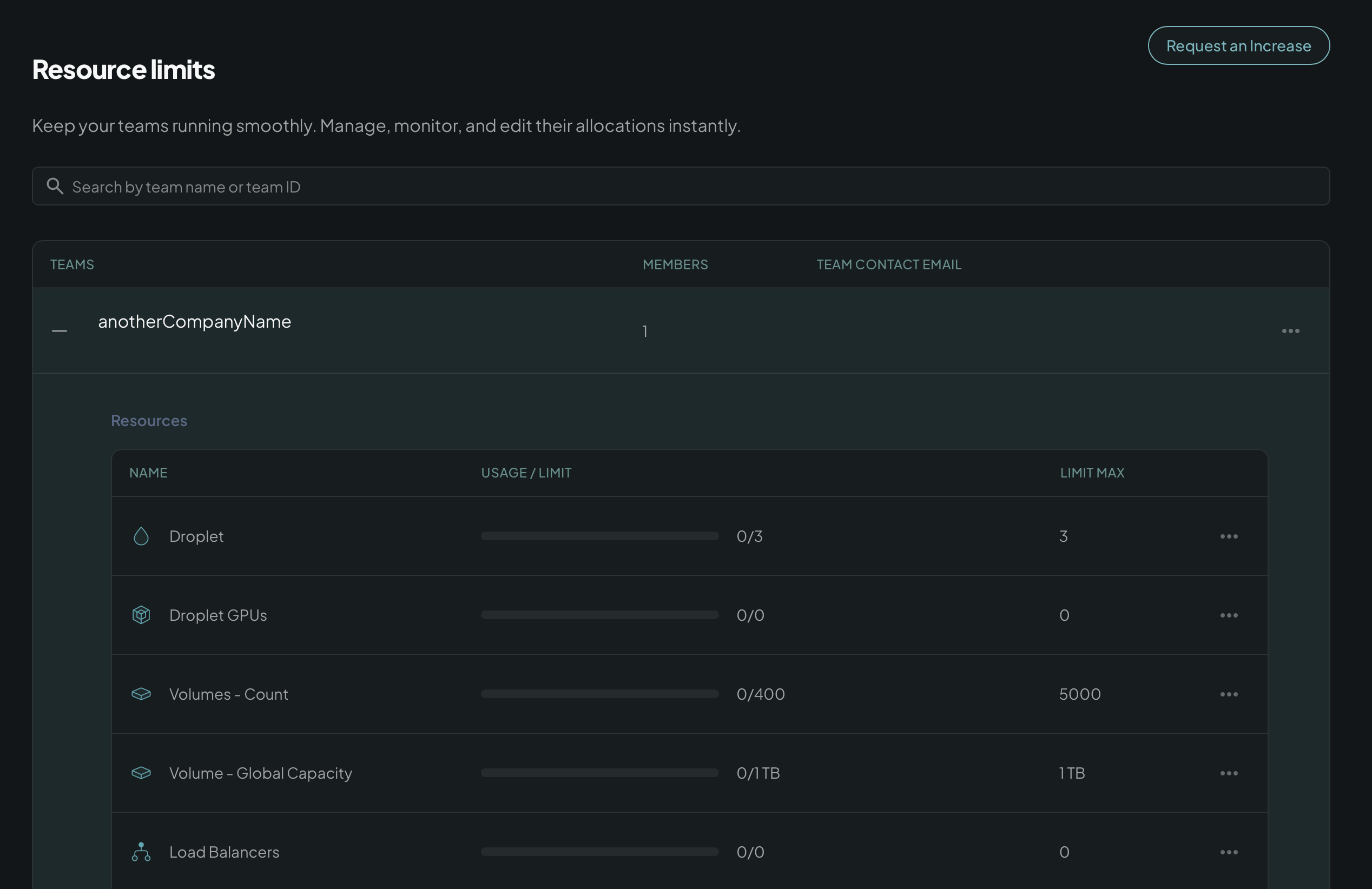
It works the same way whether you’re scaling a growing team, reining in one that’s gone off track, or just keeping spend predictable across the org. People use it for different reasons, but it’s the same tab for all of them.
At the Account level: set your own session length
Every DigitalOcean user can now choose how long their session stays signed in, from 1 hour to 30 days, right from their profile, replacing the old fixed session length. Shorter sessions for a shared or high-risk device, longer ones for a machine you trust. It’s enforced server-side, not a browser setting, and every change is logged the same way an org’s resource limits are.
Today this is a per-person setting: each user sets it for their own account, it isn’t currently something an Organization admin can set on behalf of their team.
Get started today
Both of these features are live. Resource Limits is in Organization settings, for every organization, visible to Owners and Admins. Session duration is in My Account → Profile, for every account, no opt-in needed. Open either setting, pick a value, and save.
About the author

Related Articles

Introducing Agent Droplets: everything an agent needs, one price, one bill
DigitalOcean
- October 1, 2026
- 8 min read

DigitalOcean MicroVMs: the Compute foundation for building your AI agent infrastructure (private preview)
Shridhar Pandey
- October 1, 2026
- 4 min read

Introducing DigitalOcean Managed Agents: One AI-native stack to power your intelligence
DigitalOcean
- September 22, 2026
- 11 min read